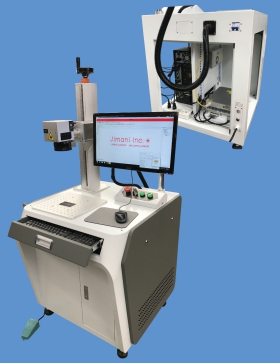
Desktop Hybrid Fiber Laser Marking System

The Jimani Desktop Low-Cost Hybrid System
- Laser Source- JPT Variable Pulse Width MOPA type laser. The standard laser is a JPT Model M7 in either a 30, 60, 80 or 100 watt configuration.
- 1.5X Reversable Beam Expander (read more here)
- Scanhead- Galvo Tech Scan Box 14 with standard XY2-100 interface
- Focusing Lens- Opex F-Theta lens. Marking Field Sizes from 4.7 to 12 inches square
- Control Board- RTC 4
- Software- Leopardmark Laser Marking Software. Prolase Laser Marking Software available for additional charge. Both software packages are American Made and Jimani provides unlimited, no charge operational support.
- Computer- Win 10 Pro 64 bit, 1 TB Solid State Drive, 8 GB ram installed
- Manual Z Axis Desktop Workstation with 19 inches of Z Axis travel. Optional extended Z axis travel available
- Footswitch for “hands free” laser operation
- Two Year Warranty
- Free Training and System Acceptance at Jimani Facility
- Application and Hardware support from Jimani
- Shipping is FOB Oxnard, CA.
- Power Requirements: 115VAC 15 Amp Service

Desktop Low-Cost Hybrid System Options
- Manual X-Y Table to facilitate of parts placement and fixturing
- Rotary for either “Handshaking” or DCA High Speed Rotary DCA Rotary requires upgrade to Prolase 10 DCA Software
- Fume Extractor- If marked material create excessive smoke or fumes, it is recommended to install some type of fume extraction to provide safety and comfort for the system operator and to protect the focusing lens from contamination
The Desktop version is an open frame system. It is a completely tested, calibrated and configured system and is ready for use as soon as it is removed from the shipping container and connected to a 115 VAC 15 amp power source. It is highly recommended that the operator use appropriate laser safety glasses when marking or engraving. One set of OD 6+ @ 1064nm laser safety glasses is provided with each system.